
A laptop can handle work, study, entertainment and creative tasks on its own, but the right accessories can make it more comfortable and practical to use. Whether you work from home, travel frequently, study at college or spend long hours at your desk, a few well-chosen upgrades can make a noticeable difference.
The best laptop accessories for 2026 are not necessarily the most expensive gadgets. They are the ones that solve everyday problems, such as limited ports, uncomfortable viewing angles, difficult navigation, limited storage and lack of protection.
This guide covers six practical accessories that can improve your laptop setup. You will also learn what to check before buying and which upgrades make the most sense for your needs.
For more useful technology recommendations, explore our Daily Tech Essentials
1. Laptop Stand
A laptop stand is one of the easiest ways to improve a desk setup. Raising the screen closer to eye level can create a more comfortable viewing position, especially when you spend several hours at your computer.
Adjustable models let you change the height and viewing angle to suit your workspace. Foldable stands are also convenient if you regularly move between home, the office and travel locations.
Why It Is Worth It
Raises the screen for a more comfortable viewing position.
Helps create a cleaner and more organized desk.
Adjustable models suit different desk arrangements.
Foldable designs are convenient for travel.
Works well with an external keyboard and mouse.
Best for: Office workers, students, remote workers and anyone who uses a laptop for long periods.

Ergonomic Aluminum Laptop Stand for Desk – Adjustable & Portable Holder
Improve your posture and workspace efficiency with this durable, lightweight laptop stand. Designed with an ergonomic tilt and heat-dissipating aluminum, it keeps your device cool and elevated to comfortable eye level.
For more workspace ideas, read our guide tothe best desk setup gadgets for productivity in 2026
2. Wireless Mouse
A laptop trackpad is convenient, but a wireless mouse can provide better control for everyday tasks. It is particularly useful for spreadsheets, browsing, photo editing, design work and tasks that require precise cursor movement.
When choosing a wireless mouse, look for a comfortable shape, reliable connectivity, useful buttons and good battery life. An ergonomic design can also be helpful if you use a mouse throughout the day.
Why It Is Worth It
Provides precise cursor control for many tasks.
Can be more comfortable for extended desktop use.
Reduces cable clutter.
Is easy to carry with a laptop.
Comes in compact and ergonomic designs.
Best for: Professionals, students, designers, writers and everyday laptop users.

Ergonomic Wireless Mouse – Silent Click & Adjustable DPI Optical Tracking
Enjoy smooth wireless freedom and precise tracking with this silent click mouse. Designed for comfortable daily use with long battery life and instant plug-and-play USB connection.
3. USB-C Hub
Modern laptops often have fewer physical ports, making a USB-C hub a useful accessory. A compact hub can add connections for USB devices, displays, memory cards and other peripherals.
However, not every USB-C port or hub offers the same capabilities. USB Type-C describes the connector, while data standards and USB Power Delivery describe different capabilities. Check the specifications of both your laptop and the hub before buying.
Why It Is Worth It
Adds ports to laptops with limited connectivity.
Can connect compatible USB-A accessories and external displays.
Some models include SD or microSD card readers.
Is compact enough for travel.
Reduces the need to carry multiple adapters.
Best for: Travelers, students, photographers, remote workers and anyone with a laptop that has limited ports.

Multi-Port USB-C Hub Adapter – 4K HDMI, High-Speed USB 3.0 & Power Delivery
Expand your laptop connectivity instantly with this compact multi-port USB-C hub. Features ultra-fast data transfer speed, 4K video output and fast pass-through charging in a sleek durable design.
4. Wireless Keyboard
If your laptop is your primary computer, an external wireless keyboard can make a desk setup more comfortable. You can place the laptop on a stand and position the keyboard at a more convenient height instead of typing directly on the laptop.
Compact keyboards are useful for small desks and travel, while full-size models are better for users who regularly work with spreadsheets or need a dedicated number pad.
Why It Is Worth It
Allows more flexible keyboard positioning.
Works especially well with a laptop stand.
Wireless models help keep the desk tidy.
Compact layouts save desk space.
Is useful for long writing and office sessions.
Best for: Writers, programmers, office workers, students and remote workers.
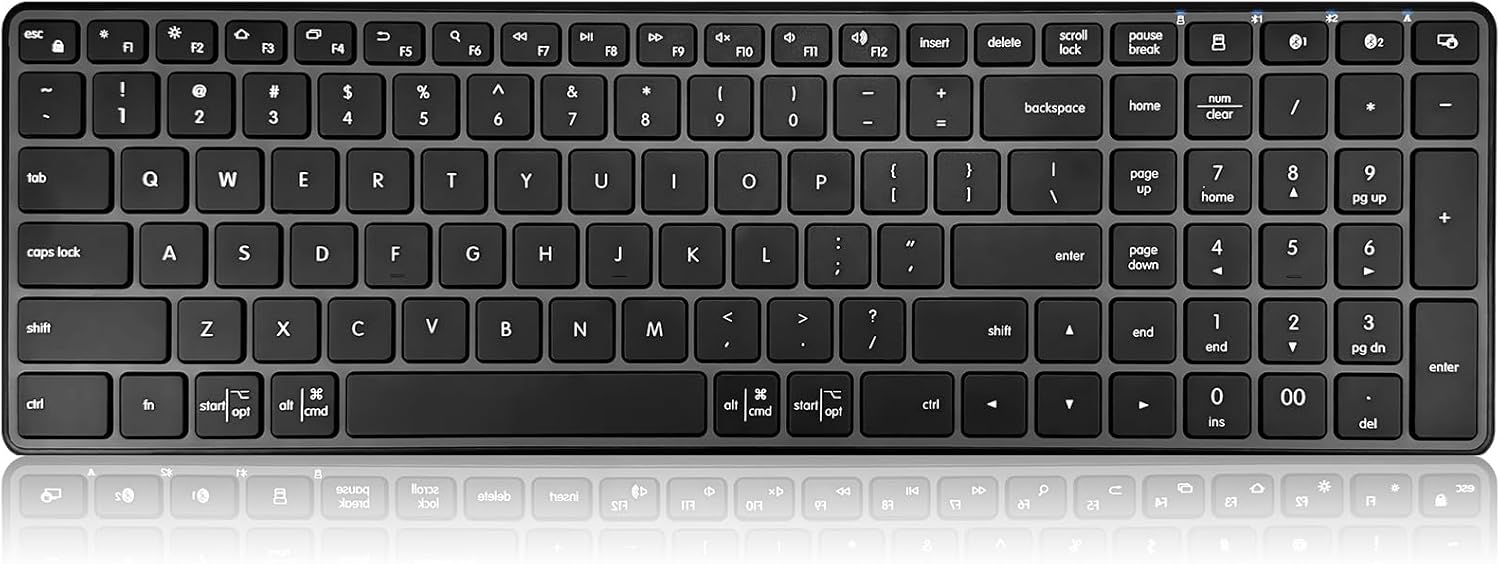
Compact Wireless Keyboard – Ultra-Slim Multi-Device Bluetooth & 2.4G Keyboard
Type comfortably anywhere with this quiet ultra-slim wireless keyboard. Offers smooth multi-device switching, responsive tactile typing and long battery life for max productivity
5. Portable SSD
If you regularly work with large files, a portable SSD can be a valuable addition to your laptop setup. It provides extra storage and makes it easier to transfer files between compatible devices.
Portable SSDs are particularly useful for photos, videos, design projects, games and backups. Actual transfer speeds depend on the drive, laptop port, cable and supported connection standard.
Why It Is Worth It
Adds storage without replacing your laptop's internal drive.
Is useful for large files and creative projects.
Is small enough to carry while traveling.
Makes backups and file transfers convenient.
Can handle large transfers efficiently when the drive and connection support high speeds.
Best for: Creators, photographers, students, gamers and professionals who manage large files.

High-Speed Portable SSD – Ultra-Fast External Solid State Drive for PC & Mac
Transfer large files in seconds with this compact shock-resistant portable SSD. Built for lightning-fast read and write speeds, reliable data security and effortless plug-and-play storage expansion.
6. Laptop Sleeve
A laptop sleeve is a simple but practical accessory if you regularly carry your computer. A properly fitted sleeve can help protect the laptop from scratches, scuffs and everyday bumps inside a backpack or laptop bag.
Look for a sleeve that matches your laptop's dimensions. Extra padding, a secure closure and water-resistant materials can provide additional everyday protection.
Why It Is Worth It
Helps protect against scratches and minor impacts.
Keeps the laptop separate from other items in your bag.
Is lightweight and easy to carry.
Comes in different sizes and materials.
Is useful for commuting, school and travel.
Best for: Students, commuters, travelers and anyone who carries a laptop regularly.

Protective Laptop Sleeve Bag – Water-Resistant Padded Case with Accessory Pocket
Keep your device safe on the go with this slim shock-absorbing laptop sleeve. Features a soft fleece lining, durable water-resistant exterior and extra storage for your charger and accessories.
How to Choose the Right Laptop Accessories
You do not need to buy all six accessories at once. Start with the upgrades that solve the biggest problems in your current setup.
For a Desk-Based Setup
Start with a laptop stand, wireless keyboard and wireless mouse. Together, these accessories give you more flexibility in how you position your screen and input devices.
For Travel
Prioritize a laptop sleeve, compact USB-C hub and portable SSD. These accessories add protection, connectivity and storage without requiring a full desktop setup.
For Students
A wireless mouse, laptop stand, USB-C hub and protective sleeve can cover many everyday needs. If you are setting up your study space, our guide to the Best tech gadgets for students in 2026 offers more ideas for studying and staying organized.
For Creative Work
A portable SSD, USB-C hub, wireless mouse and laptop stand can be useful for handling large files, connecting peripherals and working comfortably for longer periods.
What to Check Before Buying
Before purchasing any laptop accessory, check compatibility with your specific laptop.
USB-C hubs: Verify supported data speeds, display output, charging support and port types. A USB-C connector alone does not guarantee USB4, Thunderbolt or USB Power Delivery support.
Laptop stands and sleeves: Check your laptop's dimensions rather than relying only on its advertised screen size.
Wireless keyboards and mice: Confirm operating system compatibility and whether the device uses Bluetooth, a USB receiver or both.
Portable SSDs: Check the drive interface and your laptop's supported connection standard to understand the transfer speeds you can expect.
Budget: Compare useful features and build quality instead of paying extra for features you may not need.
If you use your laptop for gaming as well as everyday tasks, our guide to the Best gaming accessories in 2026 covers gear suited to a dedicated gaming setup.
Final Thoughts
The best laptop accessories in 2026 are the ones that make everyday computing easier without adding unnecessary complexity. A laptop stand can improve your desk arrangement, a wireless mouse and keyboard can make working more flexible, a USB-C hub can solve connectivity problems, a portable SSD can expand your storage, and a laptop sleeve can provide everyday protection.
You do not need every accessory to improve your setup. Choose the two or three that match the way you actually use your laptop, then add more as your needs grow.
Frequently Asked Questions
For many users, a laptop stand is one of the most useful upgrades because it can improve the viewing position and works well with an external keyboard and mouse.
Yes, especially if your laptop has limited ports. A good USB-C hub can add connections for peripherals, displays, storage devices and memory cards. Always check the hub's specifications and your laptop's supported USB-C features before buying.
Not necessarily. The built-in keyboard is enough for basic use. However, an external wireless keyboard can be useful if you use your laptop on a stand or type for several hours each day.
They serve different purposes. A portable SSD gives you physical storage and fast local file transfers, while cloud storage provides convenient access and synchronization across devices. Many users can benefit from using both.
Choose a sleeve that fits your laptop securely and has adequate padding. Water-resistant material and a reliable closure are useful additional features for commuters and travelers.
No. Start with the accessories that solve your biggest problems. For a desk setup, a stand, mouse and keyboard are a strong starting point. For travel, a sleeve and USB-C hub may be more useful.