You plug in your Galaxy S25, expect it to climb to 50% in half an hour and... it doesn't. The charger is fine. The wall outlet is fine. It's almost always the cable.
Samsung fast-charging system relies on a feature called PPS (Programmable Power Supply) and a huge number of USB-C cables on the market simply we are not built to carry it. They'll charge your phone just slowly and without you ever knowing why.
Why Cables Not Just Chargers — Determine Charging Speed
It is a common assumption that the wall charger alone decides how fast a phone charges. In reality for charging speed is negotiated between three components:
- The wall charger (must support PPS output)
- The cable (must be rated for the current and support the right data pins for negotiation)
- The phone (which requests the fastest speed the other two can deliver)
If any one of these three is underpowered or lacks the right certification, the whole chain drops to the slowest common denominator. A $60 PPS-certified charger paired with a $3 no-name cable can charge slower than a mid-range charger paired with a properly rated cable.

Anker 45W USB C Charger Block
Type C Charger Fast Charging for iPhone 17/16 Series, Phone Charger with USB-C Cable for iPad, Galaxy S24 Ultra (2-Pack, 5 ft Cable Included)
What the Galaxy S25 Actually Needs From a Cable
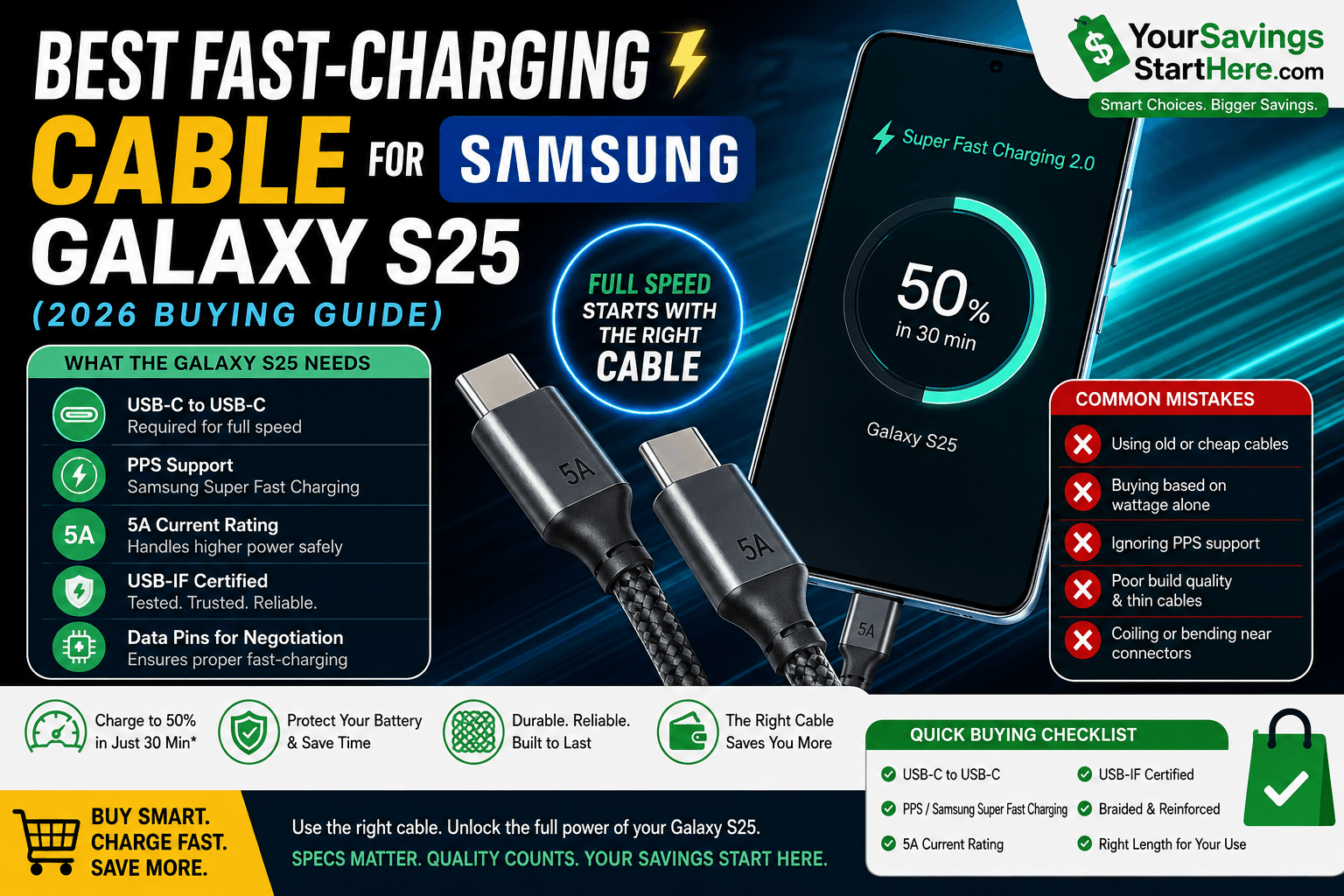
To get full fast-charging speed on a Galaxy S25. Look for a cable with these specs:
USB-C to USB-C connectors — USB-A to USB-C cables cap out at lower wattages and don't support PPS the same way.
PPS support — this is the Samsung-specific fast-charging protocol. Not all USB-C cables advertise this clearly, so look for "Samsung Super Fast Charging compatible" or "PPS supported" in the listing.
Sufficient current rating (5A preferred) — thin, low-gauge cables physically can not carry enough current and even if the charger and phone both support it.
USB-IF certification — this is the closest thing to an independent quality guarantee in the cable market. It confirms the cable was tested against USB standards rather than just marketed with buzzwords.
Data pins for proper negotiation — some ultra-cheap "charge-only" cables skip the data lines needed for the phone and charger to agree on a fast-charging profile.
If a cable is missing any of these but it will still charge the phone — just noticeably slower and often without any error message telling you why.
Cable Length and Build Quality Tradeoffs
Longer cables are more convenient, but they come with a real tradeoff: resistance increases with cable length, which can slightly reduce charging speed on marginal setups. For most people:
3–4 ft is the sweet spot for desks and nightstands — minimal speed loss, easy to manage.
6 ft is worth it for couches, cars, or shared outlets, but pair it with a thicker-gauge, well-reviewed cable rather than the cheapest option at that length.
10 ft cables exist and can work fine, but speed loss becomes more noticeable and cheap 10 ft cables are the most common source of "why is my phone charging so slowly" complaints.
On build quality, braided nylon cables tend to resist fraying at the connector far better than plain rubber-jacketed cables, which is usually where cables fail first — not in the middle, but right where the cable meets the plug.

USB C to C Cable 3ft 2Pack
Coiled USB C Charger Cable for Car Type C Fast Charging Cable for iPhone 17/16/15/Plus/Pro/Pro Max/Samsung Galaxy.
Common Mistakes That Slow Down S25 Charging
Reusing an old iPhone or older-phone cable: many older USB-C cables we are not built for PPS and will silently cap your speed.
Buying based on wattage alone: a cable can be marketed as "60W" or "100W" without actually supporting the PPS protocol Samsung uses, which matters more than raw wattage for the S25 specifically.
Ignoring the charger side: even the best cable can't fast-charge if the wall charger itself does not output PPS.
Coiling or bending the cable sharply near the connector: this is the single most common cause of internal wire damage and slow, inconsistent charging over time.
How to Test If Your Current Cable Is the Problem
Use the same wall charger with a different, known-good USB-C cable.
Check if charging speed improves noticeably.
If it does, the original cable was the bottleneck — not the phone or the charger.
This quick swap test is the fastest way to confirm whether it is worth replacing your cable before buying a new charger you might not need.
Quick Buying Checklist
Before adding a cable to your cart, confirm it has:
✅ USB-C to USB-C connectors
✅ PPS / Samsung Super Fast Charging support explicitly listed
✅ 5A current rating
✅ USB-IF certification (or clear third-party testing)
✅ Braided or reinforced strain relief at the connector
✅ Length matched to how you'll actually use it (desk vs. car vs. couch)
The Galaxy S25 charging speed is only as good as the weakest link in the chain and that weak link is very often the cable, not the phone or the charger.
Look for USB-C to USB-C, explicit PPS support, a 5A rating and USB-IF certification and you ll get the full charging speed your phone is actually capable of.
Frequently Asked Questions
Any USB-C cable will physically connect and charge the phone, but only cables that support PPS and carry enough current will deliver full fast-charging speed.
No. Third-party cables can match Samsung's speeds as long as they explicitly support PPS and meet the current rating needed for brand isn't what determines speed, spec compliance is.
Thicker cables have lower resistance, which matters more as length increases. For short cables the difference is small; for longer cables (6ft+), gauge and build quality matter more.
A cable that lacks proper certification and data-pin support is more likely to charge slowly or inconsistently than to cause damage. But poorly made cables with no certification are a legitimate safety concern over time for especially if they overheat.
Check the product listing or packaging for explicit mention of PPS or "Samsung Super Fast Charging" compatibility wattage numbers alone do not confirm this.